“There’s an app for that” – Our 10 favourite photography apps

These days, most of us walk around with some kind of smart phone in our pockets, spending our lives tweeting and playing Candy Crush or whatever the current variant is called now… Surely though, we can think of better uses for these technological pieces of advancement than touching pieces of virtual sweets? Is this what it feels like to get old?
Thankfully, there is an abundance of practical and useful apps out there, which can make everyday life more manageable, especially in the world of photography. Here is our guide to 10(ish) of the best mobile and tablet apps worth using…
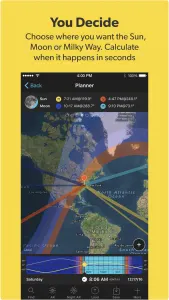
Photopills and TPE (The Photographers Ephemeris) – £8.99-£9.99
I have bundled these two together as they offer very similar features. Planning applications such as “Photopills” and “TPE – The Photographers Ephemeris” take a lot of the guesswork out of location scouting. Find the location you would like to shoot from on the map, drop a pin, choose the time and date you will be there and the app will tell you what time the sun or moon will rise / set, and at exactly what position. Photopills will even tell you the best times to capture the milky way, as well as a whole host of other information. While neither are the cheapest apps in the world, (both cost around £9-10) they are definitely worth the money for a landscape shooter who likes to be organised. Which should you go for? Well until recently Photopills was iOS only but both are now available on iOS and Android. We prefer Photopills as it has a few extra features.
MSW Surf Forecast – FREE

Stick with me… while not strictly a photography app, landscape shooters or those who like to shoot by the sea will thank us. Magic Seaweed is a great app for working out tide times at a given location. If your shot depends on a low tide for example, being able to plan which day the low tide will coincide with sunrise or sunset is a massive advantage. There is no point arriving at a location to get a specific shot, only to find it is underwater because the tide is in!
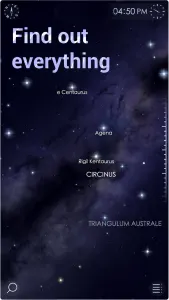
Star Walk & Star Walk 2 – £2.99 – £4.99
In a similar fashion to the planner applications above, those who like to shoot the night sky / milkyway have a great list of tools at their disposal. Knowing exactly where in the sky the milkyway or other constellations are helps a great deal and speeds up the process of setting up and composing a shot. Simply hold your phone up to the sky. The app will calibrate itself and then you can move your phone around to see what is where. We personally prefer “Star Walk” over its cheaper sequel, but both are great. Another recent option that utilises iPhones new AR feature is “Night Sky”, which uses your camera to plot the night sky over the top of your actual location, which is nice!
Dark Sky Finder – £2.99
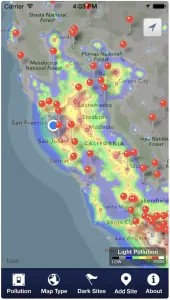
Knowing where best to head to is another useful aspect of night photography, so we also recommend “Dark Sky Finder” to compliment your planner apps. The app contains a massive heat-map of the light pollution across the globe. Find your location and the map will give you the best chance of finding the darkest areas to shoot.
Pocket Light Meter – FREE (£1.99 to remove ads)
We have only recently come across Pocket Light Meter, and while rather sceptical at first, it has actually surprised us. In essence, it works in a similar way to a traditional light meter, however the app utilises the camera on your phone to measure the light in the scene and displays a list of appropriate camera settings. Changing one of those settings by scrolling up or down will show you how it effects the other settings. While using this alongside a DSLR, we were surprised how accurate it was. It is obviously no substitute to a real light meter, but it is great for a cheap app.
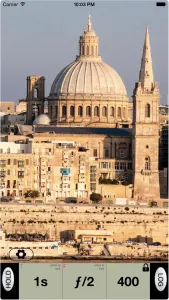
NiSi Filters Exposure Calculator – FREE

Knowing how long to set your shutter speed when using ND filters can become a tedious task, especially when using something strong like a 10 or 15 stop filter. Eventually, you will get bored of counting and want a quick and easy way of calculating the perfect exposure.
The app could not be simpler; you tell the app what your shutter speed is without the filter fitted, tell it what filter you are using and BAM, it tells you the perfect shutter speed to suit that filter. It even has a built in timer so you do not even have to sit there and count the seconds!
While there are a huge list of other apps to choose from, we like the NiSi app as the UI is very clean, and it’s free; our favourite price.
Instagram – FREE
Short of living on the moon for the last few years, chances are you have heard of Instagram. You probably think it is for hipsters to share photos of their coffees and cakes with other hipsters, while applying god-awful filters to them. While this was very true during its early inception, times have moved on and proper photographers have moved in and kicked the hipsters to the corner. It is now a great platform to display your work to other photographers, and get some inspiration at the same time. Many up and coming photographers have found work through using Instagram. It is definitely a leap forward from a place to upload dodgy “selfies”.

Snapseed – FREE
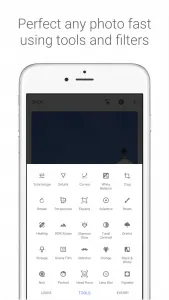
When it comes to giving a photo an edit or a retouch, Snapseed is one of the best and most powerful apps around. It has a heap of preset filters, or if you so desire, the ability to do pretty much anything else you could want. Cropping, colour and white balance tuning, curves, detail enhancing, healing, cloning and more. The list of adjustments is huge. For a free app on your phone, we do not think you could do better.
Lightroom Mobile – FREE
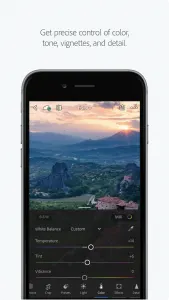
Having just said we do not think you could do better than Snapseed, it seems a little contradictory to then recommend Lightroom Mobile, however we think they serve different purposes. While Snapseed is great for making casual adjustments to JPGs, Lightroom Mobile lets you do more detailed adjustments to RAW Files. What sets it apart for us is the ability to sync with the catalogue on your computer, so you can edit your RAW files while on the move, and continue where you left off when back at your computer. While it does not offer every adjustment that the desktop application does, it is very close and it is still expanding. We use Lightroom Mobile on an iPad Pro and it is a fantastic addition to the desktop workflow.
My Gear Vault- FREE
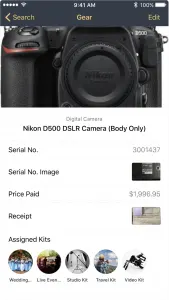
Keeping track of all the stuff you have floating around can be difficult. There are things we have forgotten we even own! Inputting everything into the My Gear Vault app is super simple, allowing you to add receipts from when you bought it, serial numbers and photos of all your camera gear and keep track of it. While some features like insurance quotes won’t work in the UK, the rest is quite usable. If any of your gear is stolen, you can black list the serial number so that if someone tries to add that serial number again, it will alert him or her that it is stolen.
Leave a Reply