
Miops Splash – Review
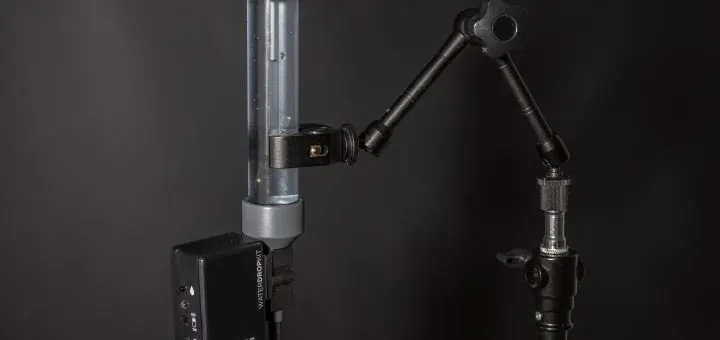
Water droppers / colliders are nothing new; they have been around for ages but chances are you have never heard of them or thought of buying one. The thing is they are not exactly an essential piece of gear or even something you are going to use on a regular basis. For those that don’t know what they do, a water collider basically fires 2 drops of water into a dish of water below it. As the first drop is fired and hits the water below, it bounces back up. The second drop is then fired, hitting the water that has bounced back up and creating a collision.
The images achieved using water colliders are great and all, but they are the kind of thing you will probably only use once or twice and then never touch it again. There are only so many photos of water drops one needs, before it becomes a creepy obsession. Because of this, they have been quite hard to justify buying. The Splash Art kit, which has been the go-to choice for some time, costs around £200 for the full setup, which is quite a lot for an occasional use toy that really only does one thing. There have been some homemade kits kicking around but they have been a bit Heath Robinson in their approach. I had one and it was inconsistent at best!
Such is the way however, third-party brands have caught wind of this idea and have developed some cheaper solutions to the problem. Those of you familiar with all-in-one versatile camera triggers have probably heard of brands such as Pluto and Miops. Their cheap camera trigger systems have become all the rage lately. Both have made water colliders, and both look relatively similar; although I would say certain details make the Miops Splash looks a little more “finished”. It is nothing against the Pluto Valve, but the exposed PCBs and switchgear just make it feel more of a homemade product. It is however, significantly cheaper than the Miops so it is worth bearing that in mind. I however, opted for the more expensive and more premium looking Miops Splash (I didn’t think exposed PCBs and water were a match made in heaven).
Speaking of price, the Pluto Valve comes in at just $40 or around £28 and the Miops Splash at $79 or £56. Neither system comes with a mounting mechanism, however you can buy a clampy-arm arrangement on eBay for around £10. Miops do offer a bespoke mounting system for an additional $20 if you are that way inclined. Even at double the cost of the Pluto, the Miops still offers great value for money, and I think places it back in the “justifiable silly toy” category. You are not going to have to use it every week to feel like you are getting your money’s worth out of it.
Build quality seems pretty decent; it is nicely put together with good quality plastics. The buttons have a nice feel to them, and the plugs for the trigger cables have a firm click to them. The unit comes with a small 1.5v battery already installed, however changing the battery requires the removal of 4 small screws to remove the back cover. A dedicated battery tray with a tool-less sliding cover would have been nice but that’s just being nit-picky. It would have involved more complex moulding, increasing the price, so I can see the reasoning behind the decision. The water canister is a reasonable size, enough for a decent amount of photos before it runs dry and the cap fits nice and tightly. One feature I’m not totally sold on though is the process of fitting the cap. Push the cap on too quickly and you’re treated to a geyser style fountain of water out of the air hole. The instructions do say to push the cap down slowly and don’t cover the hole, but who reads instructions? I’ve found even when pushing the cap down as slowly and gently as I possibly can, water still squirts out. It may just be a practice thing, or perhaps that is just how it works? Either way, I recommend having a towel handy when refilling the canister!
On to usability. Unlike the Splash Art, the Miops Splash is battery powered and all controlled from an app on your smart phone via Bluetooth, creating a virtually cable free environment. No finding a wall socket, and tripping over loads of cables between the dropper, control box and wall! There is no external power socket, so it is purely battery powered. I was a little concerned about longevity, however after a several hours of use my battery is still reading 92% battery so you are not going to be changing the battery all that often. The app works on iOS and Android and is nicely designed. It is responsive and slick to use. Using the Splash couldn’t be much simpler. Simply turn it on, launch the app, select Miops Splash, wait a second or two and the device and the app instantly pair. That’s it, you are ready to go. The app gives you control over the size of each drop, the delay between the drops, and the delay for the flash / camera trigger.
Actually getting a water collision though, is a little bit of trial and error at the start. When you first use the app, everything is set to 0 milliseconds. My brain doesn’t work in milliseconds so just trying to work out how many milliseconds I need to set for drop 1 was a little haphazard to say the least.
1 millisecond? No that wasn’t enough… 10 milliseconds? Still not enough… 500 milliseconds? Ok that was too much… 100 milliseconds? Oh that’s not too bad…
A rough starting guide would have been appreciated. It is a similar process with the delay, and then the camera release. However, once you have a rough baseline that works, you can then far more easily fine tune to get the drops exactly as you want them. Even a 1 millisecond delay can make quite a change in the image you capture. This is one of the big upsides to using an app instead of a control box with dials. Having that much control over everything means you can far more accurately alter the behaviour of the water. You cannot be that accurate with the dials on the Splash Art.
The Miops Splash has a couple of methods of helping you take the perfect shot. You can of course just hit the “go” button and time it perfectly using the camera shutter button; I actually quite enjoy this method as it takes more skill and you feel like you have earned that photo! If, however, you want a bit more repeatability, the Splash has 2 ports which will allow you to fire your flash or your camera using the delay function. The kit comes with a supplied sync cable, which goes between the “flash” port on the device and your flash’s pc sync port. Set your camera to a couple of second exposure in a dark room, and the Splash will fire the flash at the designated time, freezing the motion. I’ve tried this method a few times and it works very well. There is also a “camera” port, which it apparently fires the camera and flash for you (a separate cable is needed to go between the Splash and the camera’s remote port). I’ve tried this option too but so far I have not yet been able to get this to work, despite setting it as the instructions say. It may be a cabling issue, or a fault with the unit I have; I’m not totally sure.
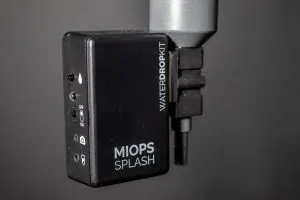
The results the Splash delivers are really good. With fine adjustment, you can get some interesting collisions that make interesting photographs. Unlike some kits I’ve used, it is very consistent and reliable. The compact nature makes it easy use at home and store away when not needed and being battery powered makes it super quick to setup and get snapping. It also makes it a great portable solution for those who offer mobile workshops or something.
All in all, I really like the Miops Splash. It’s a well built, easy to use and relatively cheap way of getting those interesting water collision photos. Although it is more expensive than the Pluto Valve, I think it is an all-round better put together product which easily justifies the higher price tag. While it is not an essential every day piece of kit, it is an awesome toy for the odd rainy day.
A relatively inexpensive toy for odd occasions. It’s nicely put together and works really well, but has a couple of quirks which while not deal breakers, drops it by 1 star. If you’re into macro photography especially, I’d recommend it.
Leave a Reply