Saal Digital Photobooklet – Review
I’m not normally one for photobooks; I don’t really see the need. In the age of smartphones and tablets, you can carry your whole portfolio around with you at all times. They obviously have their places, such as a gift for someone or maybe to show your Nan who thinks an iPad is some kind of optical treatment, but for the rest of the time I’m not so sure. That is not to say I’m completely against them and for a special occasion for example, having a physical book of your memories to look back on and tell a story can be a nice thing.
Saal Digital recently got in touch, asking if I’d like to try out their new photo booklets; a smaller bound version of a full blown hard back photobook. Not something I’d normally be too fussed about, but having just got back from a week trekking around Iceland, it sounded like the perfect opportunity to create one of those special mementos.
The first thing I noticed about the whole process was that the design work is done on a standalone desktop application. There is no clunky web based design tool that dies a death when the internet goes down, or times out because you’ve spent too long choosing your photos, forcing you to start all over again from square one; yes, that was a rant based on an experience I think a lot of us can relate to. Anyway, back to the design tool. Having a standalone desktop application makes it super easy to select the template you want, create your design, save it and then create another. You can save as many different templates, styles and even products as you like, so you can work out which works best for your tastes, and all in your own time. You can go back and tweak around to your hearts content. There are no concerns of being timed out, or losing all your work when the internet goes down. I really liked it, so top marks from me for that! Other printing companies need to take note!
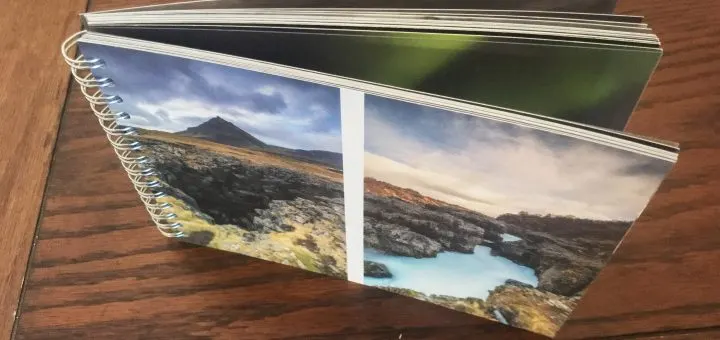
Something else I really liked, which I’ve also struggled with in the past, is the ability to spread a panorama across two pages. While I’m sure not everyone shoots panoramas and has no need to put them into a photobook, I like a panorama and it was a nice touch. Resizing and placing the photos wasn’t the most impossible task, but was awkward at times especially when placing two portrait shots onto a landscape page. I’d like to see some better snapping into position; being someone who suffers badly from OCD, not being able to easily equally space the photos frustrated me although other normal people will probably not be bothered by that in the slightest.
Overall though, the process of constructing the photo booklet was mostly pain free. I’m sure tweaks and extra features will be added to the software in time, but it’s already a very usable piece of software and is far less restricting than others that dictate exactly what style of photo should go where. This level of flexibility does mean there are many options, but it is pretty intuitive, and anyone used to design software should pick it up with ease.
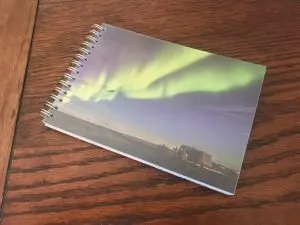
The photo booklet itself took about a week or so from ordering. While not the fastest out there, it is certainly not the slowest either. I opted for the 13×18 book, although there are loads of different sizes to choose from, including square format for those Insta-shooters. First impressions were very good. The binding is nice and allows the book to be laid completely flat to better show off those lovely panoramas, or folded over completely to see just one photo at a time. One thing I noticed was there were no logos, no advertising, no barcodes or anything across the whole product. It’s very clean and simple. Just a transparent front cover and then your photos. The paper is excellent quality and incredibly thick, although it would be nice to have a glossy option. You have the option of Matte or Art Print. I chose the art print surface, which is a matte, textured paper almost like that of a canvas. I cannot quite decide whether I like it or not though; that’s not to say it’s a bad surface, but perhaps better suited to portraiture over landscape imagery. I found it made my photos look quite noisy and grainy due to the texture.
The print quality and colour accuracy is incredible. The biggest problem with printing, especially from a company you have not used before, is you are never quite sure how well it will match what you see on screen, but I’m pleased to say this is spot on. The images perfectly match what I see on my colour calibrated monitor, which is a good sign of a quality print. There is no smudging or bleeding of one colour into the next, which helps retain a lot of detail.
Overall, I’m very pleased with the Saal Digital photo booklet. It serves its purpose as a nice memento of my trip to have sat on the coffee table to show visitors. The quality of the product is very high and I do like the desktop application for design work. While it could do with some tweaks here and there, it’s still a great tool to use. I’d definitely recommend having a look round their site at their other products.
Want to make your own? Check them out at www.saal-digital.co.uk
I’m going to give the Saal Digital Photo booklet 4 stars. The quality is exceptionally high, but I’d really like to see a high gloss option to really make the photos pop off the page. I like the binding and ability to do panoramas across two pages. The software is great but definitely needs some additional features adding in to aid design work.
Leave a Reply